On April 25th, AdWords Specialists hosted a Hangout on Air as the last installment of the Enhanced Campaigns Hangouts on Air series.
To watch the full 20-minute Hangout on Air, visit the Google Business YouTube channel.
During the Hangout, Wes explains how to adjust bids for mobile devices. He does an account walk through, demonstrating how to adjust bids for the time of day, location and device. For example, if a user is on a mobile device near your store during regular business hours, it may make sense to increase the bid. Wes explains how to calculate the actual bids when using multiple bid adjustments at the same time.
Andy then explains how to create mobile preferred ad texts and mobile preferred ad extensions. He emphasizes the importance of sending users on mobile devices to optimized mobile websites, and briefly touches upon ValueTrack parameters. This blog post further explains how to use ValueTrack parameters to manage URLs by device.
To learn more about how to get started with AdWords, visit our help center, check out the AdWords Community Forum, or call us at 866-2-GOOGLE if you already have an AdWords account.
And remember to tune in to the live stream of our next Hangout on Air at 11 a.m. PDT, Thursday May 9th, when our specialists discuss the ad approvals process in detail.
Showing posts with label mobile. Show all posts
Showing posts with label mobile. Show all posts
Monday, April 29, 2013

Tuesday, May 8, 2012
GoMo: Mark your calendar to ‘Hangout on Air’ and learn how to build a mobile site in minutes
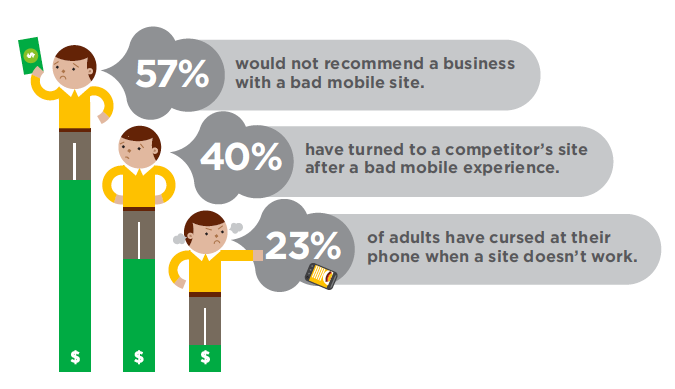
Did you know that 40% of mobile web users reported that they’ve turned to a competitor’s site after a bad mobile experience1? With about half of all Americans now owning a smartphone2, it’s time for businesses to meet user expectations by delivering a mobile experience as good as the desktop experience. In short, it’s time to step up to the plate and build a site optimized for the mobile web.
Google can help. We recently teamed up with DudaMobile to release a free mobile site builder. In three easy steps you’re able to get started with mobile: (1) enter your site’s URL, (2) customize your site and (3) redirect mobile users automatically to the new mobile-friendly version. It’s free and takes just a few minutes to complete!
Join us on Thursday, May 10th at 1pm EST/10am PST and watch as Google showcases how two businesses, Top Mast Resort in Massachusetts and Sava’s Restaurant in Michigan, go mobile and build mobile-friendly sites--live on air.
You’ll see how Top Mast is preparing to take advantage of mobile travel purchase intent - which is five times higher than online travel purchase intent, according to InsightExpress. You’ll also see Sava’s move ahead of 95% of restaurants that do not have mobile-friendly sites, according to a study by Restaurant Science.
Finally, you’ll hear from the CMO of Dudamobile, Dennis Mink; he’ll talk about best practices when using the mobile site builder and walk through important questions to ask yourself when building a mobile-friendly site.
Details on how to tune in:
Posted by Suzanne Mumford, Google Mobile Ads Marketing
Source: (1) Gomez 2011 (2) Nielsen February 2012
Google can help. We recently teamed up with DudaMobile to release a free mobile site builder. In three easy steps you’re able to get started with mobile: (1) enter your site’s URL, (2) customize your site and (3) redirect mobile users automatically to the new mobile-friendly version. It’s free and takes just a few minutes to complete!
Join us on Thursday, May 10th at 1pm EST/10am PST and watch as Google showcases how two businesses, Top Mast Resort in Massachusetts and Sava’s Restaurant in Michigan, go mobile and build mobile-friendly sites--live on air.
You’ll see how Top Mast is preparing to take advantage of mobile travel purchase intent - which is five times higher than online travel purchase intent, according to InsightExpress. You’ll also see Sava’s move ahead of 95% of restaurants that do not have mobile-friendly sites, according to a study by Restaurant Science.
Finally, you’ll hear from the CMO of Dudamobile, Dennis Mink; he’ll talk about best practices when using the mobile site builder and walk through important questions to ask yourself when building a mobile-friendly site.
Details on how to tune in:
- Sign into Google+ on Thursday, May 10 at 1 p.m. EST/10 a.m. PST
- Go to the Think with Google Google+ page
- Look for the stream post and click to enter the live stream
Posted by Suzanne Mumford, Google Mobile Ads Marketing
Source: (1) Gomez 2011 (2) Nielsen February 2012
Wednesday, October 19, 2011
Small businesses in NYC help fight breast cancer with Pink Pin
This October and November, Google and Susan G. Komen for the Cure are taking the fight against breast cancer to New York City with the Pink Pin initiative. The Pink Pin initiative is a way for businesses to support the fight against breast cancer by encouraging consumers to donate to the search for a cure.
Physical businesses who register at PinkPin.com will be marked with a Pink Pin on our map. Customers who visit these businesses will be able to donate to Susan G. Komen for the Cure at stores via mobile phones. The more customers businesses reach, the more of an impact Pink Pin will have—and the closer we’ll be to a cure. We’re also encouraging businesses and consumers to inspire others by sharing their stories about the cause online at www.pinkpin.com. Our goal is to raise hope, raise spirits and raise more than $100,000 for Susan G. Komen for the Cure.
So get involved, get on the map, share your stories and be a part of Pink Pin. With the support of small businesses like yours, Google and Susan G. Komen for the Cure can help take breast cancer off the map.
Physical businesses who register at PinkPin.com will be marked with a Pink Pin on our map. Customers who visit these businesses will be able to donate to Susan G. Komen for the Cure at stores via mobile phones. The more customers businesses reach, the more of an impact Pink Pin will have—and the closer we’ll be to a cure. We’re also encouraging businesses and consumers to inspire others by sharing their stories about the cause online at www.pinkpin.com. Our goal is to raise hope, raise spirits and raise more than $100,000 for Susan G. Komen for the Cure.
So get involved, get on the map, share your stories and be a part of Pink Pin. With the support of small businesses like yours, Google and Susan G. Komen for the Cure can help take breast cancer off the map.
Wednesday, January 12, 2011
Now available: Google Places with Hotpot for iPhone
[Cross-posted from the Hotpot Community blog]
We recently released Google Places with Hotpot in Google Maps for Android, and starting now, you can have that same great experience as an iPhone app. We realize the importance of finding places you’ll love while you’re out and about, no matter what mobile device you use. And Places with Hotpot not only helps you find places near where you are, it gives you the best places to go for you by personalizing your search results.
In case you aren’t familiar with Google Places, it lets you quickly search for places nearby and personalizes the results based on places you’ve rated. We get you started with a few popular search categories, but you can also tailor the list by adding your own favorite searches. This makes it fast and easy to find the best places for you with little fuss.

It can be pretty rewarding to discover a new place you love, but we also realize that there are some experiences you just can’t wait to share. So Places makes it super simple to rate a place with your iPhone while you’re there. Just fire up the app and hit “Rate now.” It will use your location to guess your current place and let you post a Hotpot review right from your phone. But it’s not just about getting to say what you think—the more you rate places, the more you’re sharing about your tastes and the more we can give you personally tailored recommendations.

If you want to make things even tastier, just visit google.com/hotpot from your desktop computer. Here you can add friends to the mix and quickly rate all the places you already know. Once you’ve added friends, you’ll find your results seasoned not just with reviews from around the web and recommendations based on your own personal taste, but also with your friends’ opinions too.

Get the Places app on your iPhone now by searching for Google Places in the App Store or going here.
This first version of Places is available for all iOS devices in English only. However, expect more features and improvements to roll out soon, including localization in many new languages. We’re hard at work to make Places with Hotpot more and more delicious.
We recently released Google Places with Hotpot in Google Maps for Android, and starting now, you can have that same great experience as an iPhone app. We realize the importance of finding places you’ll love while you’re out and about, no matter what mobile device you use. And Places with Hotpot not only helps you find places near where you are, it gives you the best places to go for you by personalizing your search results.
In case you aren’t familiar with Google Places, it lets you quickly search for places nearby and personalizes the results based on places you’ve rated. We get you started with a few popular search categories, but you can also tailor the list by adding your own favorite searches. This makes it fast and easy to find the best places for you with little fuss.

Use a default search category, save your own, or rate the nearest place quickly.
It can be pretty rewarding to discover a new place you love, but we also realize that there are some experiences you just can’t wait to share. So Places makes it super simple to rate a place with your iPhone while you’re there. Just fire up the app and hit “Rate now.” It will use your location to guess your current place and let you post a Hotpot review right from your phone. But it’s not just about getting to say what you think—the more you rate places, the more you’re sharing about your tastes and the more we can give you personally tailored recommendations.

Give your star rating and add optional details or a review so Hotpot knows your taste.
If you want to make things even tastier, just visit google.com/hotpot from your desktop computer. Here you can add friends to the mix and quickly rate all the places you already know. Once you’ve added friends, you’ll find your results seasoned not just with reviews from around the web and recommendations based on your own personal taste, but also with your friends’ opinions too.

Once you start rating and add friends, Places can give you personalized recommendations.
Get the Places app on your iPhone now by searching for Google Places in the App Store or going here.
This first version of Places is available for all iOS devices in English only. However, expect more features and improvements to roll out soon, including localization in many new languages. We’re hard at work to make Places with Hotpot more and more delicious.