Calling all AdWords Express advertisers! Now there’s a place to ask questions, post answers, and learn from other advertisers: the AdWords Express section of the AdWords community.
Whether you need a how-to guide for changing your ad text, or you want to get into the nitty gritty of online advertising strategy, you can join the discussion in the new community section. In addition to help from other advertisers and Top Contributors, you can also get answers and support from the Google team.
The AdWords Express section is currently available in the English language AdWords Community.
See you there!
Showing posts with label Adwords Express. Show all posts
Wednesday, September 4, 2013
Thursday, May 16, 2013
A fresh look for AdWords Express
Cross-posted with Inside AdWords.
Today, when you log into AdWords Express, you’ll notice a brand new look. We’ve listened to your feedback and worked with a lot of small businesses to streamline the AdWords Express experience. It’s part of our ongoing efforts to make Google products more beautiful and efficient.
Clearer stats and reporting graphs
Small business owners have told us that they’re busy and that they don’t want to spend time looking for the information they need. We redesigned the dashboard to show you at a glance how many views, clicks and calls your ad has generated. There’s a simple pie chart for tracking your monthly spending, and you can also compare results over time with the new performance graph.
A faster, simpler signup
We’ve made some significant improvements to the signup experience. Now there are just 3 steps to start advertising: select your audience, create your ad, and select your budget. Getting your ad set up shouldn’t take more than a few minutes.
Real-time ad previews
With the new real-time ad preview box, you can now see your ad created right as you type. Just hover over the icons to preview all the ad formats that are available based on the text you provide. Try it out by creating an ad at google.com/adwords/express.
We’re constantly working to improve the AdWords Express user experience to make it easier for small businesses to get their ads online. Keep the feedback coming!
Posted by Cinthya Mohr and the AdWords Express User Experience Team
Today, when you log into AdWords Express, you’ll notice a brand new look. We’ve listened to your feedback and worked with a lot of small businesses to streamline the AdWords Express experience. It’s part of our ongoing efforts to make Google products more beautiful and efficient.
Clearer stats and reporting graphs
Small business owners have told us that they’re busy and that they don’t want to spend time looking for the information they need. We redesigned the dashboard to show you at a glance how many views, clicks and calls your ad has generated. There’s a simple pie chart for tracking your monthly spending, and you can also compare results over time with the new performance graph.
A faster, simpler signup
We’ve made some significant improvements to the signup experience. Now there are just 3 steps to start advertising: select your audience, create your ad, and select your budget. Getting your ad set up shouldn’t take more than a few minutes.
Real-time ad previews
With the new real-time ad preview box, you can now see your ad created right as you type. Just hover over the icons to preview all the ad formats that are available based on the text you provide. Try it out by creating an ad at google.com/adwords/express.
We’re constantly working to improve the AdWords Express user experience to make it easier for small businesses to get their ads online. Keep the feedback coming!
Posted by Cinthya Mohr and the AdWords Express User Experience Team
Wednesday, May 30, 2012
Helping people discover and share local businesses with Google+
When a business owner's hard work and passion are celebrated and shared by customers, a humble space can become more than just bricks and mortar, but a favorite spot, a local landmark, or a meaningful memory.
With the release of Google+ Local, rolling out today, we are bringing the community of Google+ to local business owners around the world. We aim to improve the way people discover new businesses, rediscover places they love, and share them with their friends across the web.
Simple experience for your customers
The first thing you’ll notice is the new layout and design for the listing for your business. All your basic business information is still available. And by streamlining the layout and putting more focus on photos and reviews, we hope to help you highlight what makes your business truly unique.
Helping people find, rate and share your business
With these updates, we’re connecting the millions of people on Google+ to local businesses around the world. With one listing, your business can now be found across Google search, maps, mobile and Google+, and your customers can easily recommend your business to their friends, or tell the world about it with a review.
Integrated Zagat reviews
For years, Zagat has provided trustworthy, concise, user-generated reviews, and we are excited to bring these to Google+ Local. We’ve also updated our scoring system to Zagat’s time-tested 30-point scale, so that users can better share their view about what makes a place unique.
Continue to manage through Google Places for Business
If you are a business owner, you should continue to manage your information in Google Places for Business. You’ll still be able to verify your basic listing data, make updates, and respond to reviews. For those who use AdWords Express, your ads will operate as normal as they’ll automatically redirect people to the destination you selected, or your current listing.
More changes coming soon for business owners
We know many of you have already created a Google+ Page for your business, and have been hosting hangouts and sharing photos, videos and posts. We’re excited that we’ll soon extend these social experiences to more local Google+ pages in the weeks and months ahead. To give you a sense of what’s coming, we've worked with a few business owners to fully upgrade their listings early and share their Google+ business identity across Search, Maps and Mobile.
If you don’t yet have a Google+ Page for your business, we encourage you to create one now. And if you do already have one, hold tight for news on how to get it linked to your local listing. Follow our blog, or our Google+ page, for additional updates.
Posted by Jen Fitzpatrick, VP Engineering
With the release of Google+ Local, rolling out today, we are bringing the community of Google+ to local business owners around the world. We aim to improve the way people discover new businesses, rediscover places they love, and share them with their friends across the web.
Simple experience for your customers
The first thing you’ll notice is the new layout and design for the listing for your business. All your basic business information is still available. And by streamlining the layout and putting more focus on photos and reviews, we hope to help you highlight what makes your business truly unique.
Helping people find, rate and share your business
With these updates, we’re connecting the millions of people on Google+ to local businesses around the world. With one listing, your business can now be found across Google search, maps, mobile and Google+, and your customers can easily recommend your business to their friends, or tell the world about it with a review.
Integrated Zagat reviews
For years, Zagat has provided trustworthy, concise, user-generated reviews, and we are excited to bring these to Google+ Local. We’ve also updated our scoring system to Zagat’s time-tested 30-point scale, so that users can better share their view about what makes a place unique.
Continue to manage through Google Places for Business
If you are a business owner, you should continue to manage your information in Google Places for Business. You’ll still be able to verify your basic listing data, make updates, and respond to reviews. For those who use AdWords Express, your ads will operate as normal as they’ll automatically redirect people to the destination you selected, or your current listing.
More changes coming soon for business owners
We know many of you have already created a Google+ Page for your business, and have been hosting hangouts and sharing photos, videos and posts. We’re excited that we’ll soon extend these social experiences to more local Google+ pages in the weeks and months ahead. To give you a sense of what’s coming, we've worked with a few business owners to fully upgrade their listings early and share their Google+ business identity across Search, Maps and Mobile.
If you don’t yet have a Google+ Page for your business, we encourage you to create one now. And if you do already have one, hold tight for news on how to get it linked to your local listing. Follow our blog, or our Google+ page, for additional updates.
Posted by Jen Fitzpatrick, VP Engineering
Monday, April 2, 2012
Get closer to your customers with Google+
(Cross-posted from the Inside AdWords blog.)
When we launched Google+ Pages last November, we aimed to provide you with a way to post updates and news about your business, have engaging conversations with customers, and send tailored messages to specific groups of people.
We’re now excited to share that Google Ads will be joining Google+ Pages to provide you, our advertising partners, with the latest Google advertising product news, training, tips and Hangouts that can help make the web work for you. We hope it will become a useful resource for growing your business, reaching customers in the moments that matter, and making smarter decisions.
Here’s a quick peek at what you can expect from the Google Ads page on Google+:
- Stay ahead of the curve with the latest launches and updates for Google's advertising solutions, including search, display, mobile, social, YouTube and Google Analytics
- Receive how-to information, best practices, and recommendations
- Learn about upcoming trainings and events
- Attend Hangouts with product experts
Add Google Ads to your circles here. We look forward to connecting with you on Google+.
Posted by Christina Park and Katie Miller, Ads Product Marketing
Monday, November 7, 2011
Get closer to your customers with Google+
(Cross-posted on the Inside AdWords blog.)
Editorial note: Many of you have already verified your Place page via Google Places for business. We encourage you to continue maintaining the information in your Google Places account to help ensure that potential customers can find accurate information about your business on Google Maps and local search. You may also want to supplement your Google Places account with a Google+ Page for your business, which provides you with additional ways to engage and directly interact with customers using Google+. Currently, however, Google Places accounts and Google+ Pages must be managed separately.
Since the initial launch of Google+ just a few months ago, we’ve welcomed over 40 million people and introduced more than 100 new features. For all these people, one important part is still missing - your business.
We want to help you make the same kinds of lasting connections with your customers online the way you can in real life. That’s why we are introducing Google+ Your Business, a collection of tools and products to help you get closer to your customers. At the heart of this is Google+ Pages, your business’s identity on Google+.
Google+ Pages: Have real conversations with the right people
To get your business on Google+, you first need to create a Google+ Page. On your page, you can post updates and news about your business, engage in conversations with your customers, send tailored messages to specific groups of people, and see how many +1’s you have across the web. Here are a few features of Google+ Pages that we think will help you build relationships:
Hangouts
Sometimes you might want to chat with your customers face-to-face. For example, if you run a bookstore, you may want to invite an author to talk about her latest novel, or if you market a cosmetics line, beauty specialists might want to hold how-to sessions for makeup tips. Hangouts make this easy, by letting you have high-quality video chats with nine customers, with a single click. You can use Hangouts to get product feedback, help solve problems or simply get to know people better, all in real time.
Circles
Circles allow you to group followers of your Page into smaller audiences. You can then share specific messages with specific groups. For example, you could create a Circle containing people who are your most loyal customers and offer them a special discount.
+1 button and Google+ badge: Inspire current customers to recommend new ones
Google+ Pages also help you deliver your great content to users in a way that’s easy to share with their friends. We introduced the +1 button as a way for your customers to recommend your business across the web - on Google search, in your ads, on sites across the web and on mobile devices. Now, your customers can +1 your Page, recommending your actual brand -- not just an individual ad or a site -- directly to their friends.
To help your customers find your page and start sharing, we have two buttons you can add to your site by visiting our Google+ badge configuration tool:
The Google+ icon is a small icon that directly links to your Page.

In the coming days, we’re introducing the Google+ badge, which lets people add your page to their circles, without leaving your site, to start getting updates from your business via Google+.
Make your +1’s count, improving the performance of your ads
Coming soon, we will also make it possible to link your Page to your AdWords campaigns for your site, so that all your +1s -- from your Page, your website, ads and search results -- will get tallied together and appear as a single total.
Your +1’s will be shown with your brand wherever it appears, including search, ads, Google+ and your website
Consumers will be able to see all the recommendations your business has received, whether they are looking at an ad, a search result or your page, meaning your +1’s will reach not only the 40 million users of Google+, but all the people who come to Google every day. In the coming days. you'll be able to link your page to your AdWords campaigns by following the instructions in the AdWords Help Center.
Or, if you're using AdWords Express from your Google Places account, you can link your ads to your Google+ Page by simply selecting the option to direct viewers of your ad to your Google+ Page, and entering the Google+ Page URL in the appropriate field.
You can link your Google+ Page to your AdWords account with Social Extensions. Social Extensions are available in the ad extensions tab in your AdWords account.
Bringing Google+ to the rest of Google
Our ultimate vision for Google+ is to transform the overall Google experience-- weaving identity and sharing into all of our products. Beginning today, we’re rolling out a new experimental feature, Direct Connect -- an easy way for your customers to find your Google+ Page on Google search. For eligible pages, when someone searches for your business with the ‘+’ sign before it Direct Connect will send them directly to your page. For example, try searching for ‘+YouTube’ on Google. Users will also be prompted to automatically add Pages they find through Direct Connect to their circles. Direct Connect will not work for everyone.
Just the beginning
We wanted to help you get your business on Google+ as soon as possible, so we’re opening the field trial for Google+ Pages to everyone today. Creating a Google+ Page only takes a few minutes. To get started, you’ll need a personal Google+ profile. If you don’t have a Google account, it’s very quick and easy to join. And if you are looking for inspiration, check out some of the companies that are already starting to set up their Pages:

To learn more about how Google+ works for your business, check out the Google+ Your Business site. We’re just getting started and have many more features in the coming weeks and months. To keep up to date on the latest news and tips, add the Google+ Your Business page to your circles. If you have ideas on how we can improve Google+ for your business, we’d love to hear them.
Posted by Dennis Troper, Product Management Director, Google+ Pages
Editorial note: Many of you have already verified your Place page via Google Places for business. We encourage you to continue maintaining the information in your Google Places account to help ensure that potential customers can find accurate information about your business on Google Maps and local search. You may also want to supplement your Google Places account with a Google+ Page for your business, which provides you with additional ways to engage and directly interact with customers using Google+. Currently, however, Google Places accounts and Google+ Pages must be managed separately.
Since the initial launch of Google+ just a few months ago, we’ve welcomed over 40 million people and introduced more than 100 new features. For all these people, one important part is still missing - your business.
We want to help you make the same kinds of lasting connections with your customers online the way you can in real life. That’s why we are introducing Google+ Your Business, a collection of tools and products to help you get closer to your customers. At the heart of this is Google+ Pages, your business’s identity on Google+.
Google+ Pages: Have real conversations with the right people
To get your business on Google+, you first need to create a Google+ Page. On your page, you can post updates and news about your business, engage in conversations with your customers, send tailored messages to specific groups of people, and see how many +1’s you have across the web. Here are a few features of Google+ Pages that we think will help you build relationships:Hangouts
Sometimes you might want to chat with your customers face-to-face. For example, if you run a bookstore, you may want to invite an author to talk about her latest novel, or if you market a cosmetics line, beauty specialists might want to hold how-to sessions for makeup tips. Hangouts make this easy, by letting you have high-quality video chats with nine customers, with a single click. You can use Hangouts to get product feedback, help solve problems or simply get to know people better, all in real time. Circles
Circles allow you to group followers of your Page into smaller audiences. You can then share specific messages with specific groups. For example, you could create a Circle containing people who are your most loyal customers and offer them a special discount. +1 button and Google+ badge: Inspire current customers to recommend new ones
Google+ Pages also help you deliver your great content to users in a way that’s easy to share with their friends. We introduced the +1 button as a way for your customers to recommend your business across the web - on Google search, in your ads, on sites across the web and on mobile devices. Now, your customers can +1 your Page, recommending your actual brand -- not just an individual ad or a site -- directly to their friends. To help your customers find your page and start sharing, we have two buttons you can add to your site by visiting our Google+ badge configuration tool:
The Google+ icon is a small icon that directly links to your Page.
In the coming days, we’re introducing the Google+ badge, which lets people add your page to their circles, without leaving your site, to start getting updates from your business via Google+.
Make your +1’s count, improving the performance of your ads
Coming soon, we will also make it possible to link your Page to your AdWords campaigns for your site, so that all your +1s -- from your Page, your website, ads and search results -- will get tallied together and appear as a single total.
Your +1’s will be shown with your brand wherever it appears, including search, ads, Google+ and your websiteConsumers will be able to see all the recommendations your business has received, whether they are looking at an ad, a search result or your page, meaning your +1’s will reach not only the 40 million users of Google+, but all the people who come to Google every day. In the coming days. you'll be able to link your page to your AdWords campaigns by following the instructions in the AdWords Help Center.
Or, if you're using AdWords Express from your Google Places account, you can link your ads to your Google+ Page by simply selecting the option to direct viewers of your ad to your Google+ Page, and entering the Google+ Page URL in the appropriate field.
You can link your Google+ Page to your AdWords account with Social Extensions. Social Extensions are available in the ad extensions tab in your AdWords account.Bringing Google+ to the rest of Google
Our ultimate vision for Google+ is to transform the overall Google experience-- weaving identity and sharing into all of our products. Beginning today, we’re rolling out a new experimental feature, Direct Connect -- an easy way for your customers to find your Google+ Page on Google search. For eligible pages, when someone searches for your business with the ‘+’ sign before it Direct Connect will send them directly to your page. For example, try searching for ‘+YouTube’ on Google. Users will also be prompted to automatically add Pages they find through Direct Connect to their circles. Direct Connect will not work for everyone. Just the beginning
We wanted to help you get your business on Google+ as soon as possible, so we’re opening the field trial for Google+ Pages to everyone today. Creating a Google+ Page only takes a few minutes. To get started, you’ll need a personal Google+ profile. If you don’t have a Google account, it’s very quick and easy to join. And if you are looking for inspiration, check out some of the companies that are already starting to set up their Pages:

To learn more about how Google+ works for your business, check out the Google+ Your Business site. We’re just getting started and have many more features in the coming weeks and months. To keep up to date on the latest news and tips, add the Google+ Your Business page to your circles. If you have ideas on how we can improve Google+ for your business, we’d love to hear them.
Posted by Dennis Troper, Product Management Director, Google+ Pages
Thursday, October 13, 2011
Faster updates to local business listings
(Cross-posted on the Lat Long Blog.)
Our goal to create a digital representation of the real world doesn’t just mean a birds’ eye view through Google Earth, or a street-level view through Google Maps. It means providing a local view as well, and tools like Google Places help people across the globe learn about and connect with the places and businesses in their immediate areas.
We use a variety of authoritative sources to give users relevant local information about places that might interest them, including data from partners, users, and directly from business owners who verify their organic listings via Google Places for business. In addition, we always want to know about changes to a business that should be reflected on our local search products. That’s why we have the “Report a problem” tool on Google Maps, and also enable users to click on the "Edit this place” link at the top of the Place page to provide updates to a business listing.
And while some business owners may have previously verified their organic listing to ensure that their company information was correct at that particular moment in time, we recognize that amidst all the work that goes into running a successful enterprise, remembering to update their Google Places account may not always be top of mind. Oftentimes, a neighborhood local or a loyal customer is eager to help their favorite business update its online presence when it moves into a bigger space across the street, or extends its hours for the summer season.
That’s why today, we’re introducing a new process that helps streamline the way updates are made to potentially outdated or incorrect business listings. Previously, verified business listings would always reflect the information provided by its owner - even if we received data about an updated name, address, or hours of operation. But now, if a user provides new information about a business they know -- or if our system identifies information from another source on the web that may be more recent than the data the business owner provided via Google Places -- the organic listing will automatically be updated and the business owner will be sent an email notification about the change. Without requiring any effort on the part of the business owner, we’ll take measures to keep their listing up-to-date if our system determines that the edit is accurate. Of course, if the business owner disagrees or has even more recent information, they can always directly log in to their Google Places account and make further edits.
Online ads from business owners using our AdWords or AdWords Express programs will not be affected by these automatic updates. Ads will continue to display the business information the owner has provided in Google Places.
We hope these new features help users find the most accurate local information available, and make it even easier for business owners to manage their online presence. If you’re a business owner with additional questions about your specific listing, please consult the Google Places for business Help Center or visit our user support forum.
Posted by Lior Ron, Google Places Product Manager
Our goal to create a digital representation of the real world doesn’t just mean a birds’ eye view through Google Earth, or a street-level view through Google Maps. It means providing a local view as well, and tools like Google Places help people across the globe learn about and connect with the places and businesses in their immediate areas.
We use a variety of authoritative sources to give users relevant local information about places that might interest them, including data from partners, users, and directly from business owners who verify their organic listings via Google Places for business. In addition, we always want to know about changes to a business that should be reflected on our local search products. That’s why we have the “Report a problem” tool on Google Maps, and also enable users to click on the "Edit this place” link at the top of the Place page to provide updates to a business listing.
And while some business owners may have previously verified their organic listing to ensure that their company information was correct at that particular moment in time, we recognize that amidst all the work that goes into running a successful enterprise, remembering to update their Google Places account may not always be top of mind. Oftentimes, a neighborhood local or a loyal customer is eager to help their favorite business update its online presence when it moves into a bigger space across the street, or extends its hours for the summer season.
Online ads from business owners using our AdWords or AdWords Express programs will not be affected by these automatic updates. Ads will continue to display the business information the owner has provided in Google Places.
We hope these new features help users find the most accurate local information available, and make it even easier for business owners to manage their online presence. If you’re a business owner with additional questions about your specific listing, please consult the Google Places for business Help Center or visit our user support forum.
Posted by Lior Ron, Google Places Product Manager
Monday, July 25, 2011
Making local online advertising easy with Google AdWords Express
(Cross-posted on the Official Google Blog, Inside AdWords, and Lat Long blogs.)
Today, we're officially introducing AdWords Express, a faster and simpler way to start advertising online in under five minutes. We first launched this product as Google Boost last October for a small number of local businesses. Since then, we’ve continued to improve the product and enabled all U.S. businesses new to online advertising to reach customers with ease. AdWords Express is designed to help local businesses that aren't already AdWords advertisers create effective campaigns—watch the video below to see how you can create and run an online campaign from start to finish in just a few clicks:
AdWords Express helps potential customers find your website or Place page, and gives you a quick and straightforward way to connect with them and grow your business. You simply provide some basic business information, create your ad, and your campaign is ready to go.
After you sign up, the campaign will be automatically managed for you. AdWords Express will figure out which searches should trigger your ad to appear and displays it when these searches happen. Your ad will be shown in the Ads section of search results pages—on the top or right hand side—and in Google Maps with a distinctive blue pin. Customers can see your ad whether they’re searching on laptops or mobile phones.
As with all our ad products, you pay only when a customer clicks on your ad. To make things even easier, AdWords Express optimizes your ads to get the most out of your advertising campaign and budget.
Many businesses are already finding success through AdWords, but we know many of you are looking for an easier way to begin advertising online. Visit www.google.com/awexpress to sign up or learn more about how it works.
Posted by Kiley McEvoy, Product Manager, AdWords Express
Wednesday, April 20, 2011
Next Stop: San Diego, California
(Cross-posted on the Google Places Blog.)
Every day, more and more users are looking online for local information — where to eat, where to stay, where to shop. Online is where business owners need to be too. So for the past several months, we’ve launched marketing campaigns promoting our core local product offering Google Places in five cities: Portland, Austin, Las Vegas, Madison and Charlotte. In each of these cities, we’ve been working closely with local business owners, showing them how Google Places can help them get found on Google and connect them with their customers.
We’re excited to announce that the next campaign is hitting San Diego, California, today — our largest city to date!
With more than 77,000 local businesses, San Diego is the perfect next city in our campaign to help local businesses get noticed on Google. Plus, with nearly three million residents and more than 30 million tourists visiting the city annually, we see a great opportunity to help locals and tourists alike share and discover great San Diego businesses online.
Over the next several weeks, we’ll be working with business owners in a bunch of ways:
If you see us around town, say hello! We look forward to working with San Diego’s amazing community of business owners.
Posted by Sameer Mahmood, Local Marketing Team
Every day, more and more users are looking online for local information — where to eat, where to stay, where to shop. Online is where business owners need to be too. So for the past several months, we’ve launched marketing campaigns promoting our core local product offering Google Places in five cities: Portland, Austin, Las Vegas, Madison and Charlotte. In each of these cities, we’ve been working closely with local business owners, showing them how Google Places can help them get found on Google and connect them with their customers.
We’re excited to announce that the next campaign is hitting San Diego, California, today — our largest city to date!
With more than 77,000 local businesses, San Diego is the perfect next city in our campaign to help local businesses get noticed on Google. Plus, with nearly three million residents and more than 30 million tourists visiting the city annually, we see a great opportunity to help locals and tourists alike share and discover great San Diego businesses online.
Over the next several weeks, we’ll be working with business owners in a bunch of ways:
- A team of Google reps will be visiting businesses with information about how to claim their Place page and keep their information up to date. They’ll also highlight how business owners can encourage their customers to rate and review their business on Google and share those recommendations with their friends.
- Business owners who have verified their free Place page can request a Google Places starter kit. Visit googleplacescatalog.com for more information. Part of this kit is our “Recommended on Google” sticker, which utilizes NFC technology to enable users with smartphones, such as the Nexus S, to see more information about that business and easily rate and review it right then and there.
- Businesses eligible to participate in a beta for Google Boost — our online advertising program — will receive $100 coupon offers to get started.
If you see us around town, say hello! We look forward to working with San Diego’s amazing community of business owners.
Posted by Sameer Mahmood, Local Marketing Team
Helping America’s startups grow
[Cross-posted from the Official Google Blog]
To further help new American businesses create economic growth, today we’re announcing a commitment of up to $100 million to the Startup America Partnership—an alliance of the country's most innovative entrepreneurs, corporations, foundations and other private sector leaders—for companies to promote their business with Google advertising over the next year.
Startup America participants will be able to use Google advertising platforms like AdWords and Boost and receive a $1,000 Google match for $1,000 spent between June 1, 2011 and June 1, 2012. Our chief economist Hal Varian has calculated that businesses make an average of $2 in revenue for every $1 they spend on AdWords, so we think this commitment will be especially powerful.
If you are (or know of) an entrepreneur that’s interested in getting involved with the Startup America Partnership, you can visit its Resource Center for more information. Our goal as a participant in this national initiative is to help entrepreneurs grow amazing businesses, and we believe our commitment will help them do it.Posted by Claire Hughes Johnson, Vice President, Global Online Sales
Tuesday, January 25, 2011
Google Boost: Now Appearing On Mobile Phones
(Cross-posted from LatLong)
Back in October we announced Google Boost, a new advertising solution to help local businesses connect with potential customers in their area. Today we are excited to announce that Boost ads can appear on Google Search results pages on Android and iPhone devices.

Consumers increasingly use mobile devices to search for products and services, and Boost will give advertisers the opportunity to reach these customers exactly when they are looking for local businesses on their phones. This feature will automatically take effect for current and future Boost advertisers.
In case you aren’t familiar with Boost, it’s Google's new advertising product that helps business owners quickly create an online advertising campaign that targets local customers. Using information from the business’s free Google Places listing, Boost automatically suggests and creates text ads that appear on Google Search and Google Maps results pages.
Google Boost is now available in all U.S. cities to select business types. To find out if your business is eligible, sign in to your Places account (or create a free one if you haven’t yet) and visit the Dashboard. If Boost is not currently available to your business, fill out this short form and we’ll notify you when it is.
Posted by Kiley McEvoy, Product Manager
Tuesday, November 16, 2010
Google Boost: Now available in additional U.S. cities
We recently announced that our new search advertising program, Google Boost, is available to local businesses in San Francisco, Houston and Chicago. Based on the great feedback and results from early participants, the beta is expanding to additional U.S. cities. Starting today, select local business owners can sign in to their Google Places account and try Boost if they’re located in San Jose, Seattle, Wichita, Charlottesville (VA), Atlanta, Chapel Hill, Orlando, Washington D.C., Boston, Cross Plains (TX) and Portland (ME). We’ve also made Boost available for all local businesses in Illinois.
For those of you who are not yet familiar with Boost, it’s a quick and easy way for local businesses to market themselves and connect with potential customers in their area. Based on the information you’ve already provided on the Place page for your business, we provide a suggested ad description, a web or Place page, your business categories and a monthly budget. Once you’ve confirmed these four simple elements, our system automatically creates an ad campaign. Your ad may start appearing almost immediately when people in your area search online for products and services related to your offering. And what’s more, you’ll only pay when a potential customer actually clicks on your ad. To be clear, the ranking of Boost ads in the “Ads” section of the Google.com and Google Maps search results pages are based on relevance and quality factors; and Boost ads do not impact the ranking of your free, organic business listings.
Over the next week, eligible businesses in the cities mentioned above will see an invitation to try Boost when they sign in to their Google Places account dashboard. Business owners located outside of these areas can fill out this form to be notified when Boost expands further to their regions.
Posted by Kiley McEvoy, Product Manager
Monday, October 25, 2010
Advertise your local business with Google Boost
As a local business owner in today’s day and age, you know that it’s important to have an online presence because that’s where your customers are. In fact, research shows that 97% of people conduct research online before buying locally. Hopefully you’ve gone to Google Places to claim your free business listing that appears on Google and Google Maps. That enables you to share accurate information about your business such as your hours of operation, photos and videos - and now you can do even more.
Today, we’re announcing the availability of a new online advertising solution to help local businesses connect with potential customers in their area. Boost enables business owners to easily create online search ads from directly within their Google Places account. No ongoing management is needed after the initial set up, and this beta is currently available to select local businesses in San Francisco, Houston and Chicago.
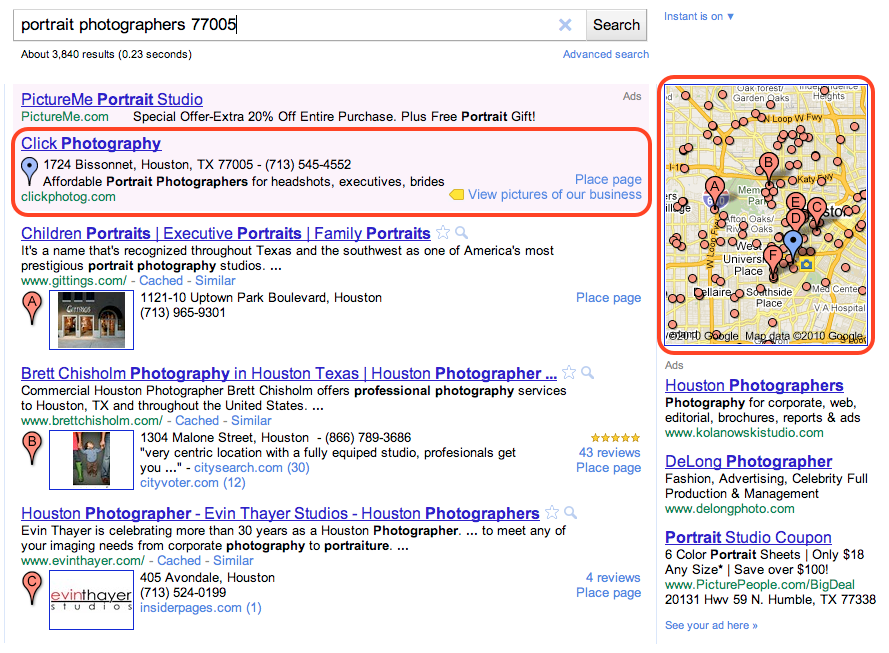
Boost ads are eligible to appear in the “Sponsored Links” section of Google.com and Google Maps search result pages. For example, if you’re a restaurant owner in San Francisco who has signed up for Boost, your ad may show up when someone does a related search like the one below, indicating a cuisine and location that matches yours. Beyond the basics like your company name, address, phone number and website, your ad may also include the number of reviews you’ve received, an average star rating and a link to your Place page to help potential customers find additional useful information about your business. When a map appears alongside the results, a blue pin will help folks quickly find your location on the map. Businesses using Google Tags will also see their yellow tag appear in the ad.

To create your ad, all that is required is a short business description, a web or Place page, your business categories and a monthly budget. From there, our system automatically sets up your ad campaign - figuring out the relevant keywords that will trigger your ad to appear on Google and Google Maps, and how to get the most out of the budget you allotted. You’ll only pay when a potential customer actually clicks on your ad, and you can also view basic ad performance data from your Google Places dashboard.
Here is an example of the simple sign up page within Google Places, which takes just a few minutes to complete. To make the process even easier, the “description” and “categories” fields may be pre-populated with suggestions based on the information you provided on the Place page for your business.

We hope Boost provides busy local business owners with a quick and easy way to share information about themselves with the people who look for them online. Placement in the “Sponsored Links” section of the page will, as always, depend on factors such as your ad’s relevance and quality. Boost does not affect the ranking of the free, organic business listings in any way.
As we do with all beta features, we’ll carefully review the data and effectiveness of this trial and may make changes before making decisions about any future expansion. In the meantime, business owners can sign in or claim their listing in Google Places, and select businesses in San Francisco, Houston and Chicago will see an invitation to try Boost in the account dashboard. Interested businesses outside these areas can sign up to receive notification when Boost comes to their area by filling out this form.
Posted by Kiley McEvoy, Product Manager